
Welcome! In this hands-on session, we'll write tests that fail, and an LLM will hand back code which passes those tests.
Expand for things you need, things you can expect
We run 09:30 – 11:00 London time. Questions are welcome any time. I can't sort out your tech, but I want to know about environment problems.
You'll need to bring an internet-connected device that you’re happy to type on. You won't need to download nor install anything for this session: We'll be using your browser to access VSCode in a cloud development environment.
You will see code: Python or JavaScript depending on preference, shell scripts from me. You'll write PyTest or Jest tests (or copy/paste them from my tests), and you'll type or paste stuff into the commandline. If you don't fancy the commandline, or you've not got the kit, there will still be plenty to do.
You'll be using an IDE in your browser. I've heard of problems related to Firefox on Windows, and I don't expect to be able to resolve them.
We will be using a Miro board to share ideas (per-workshop link for participants only so we can share). There's space on that board to share what you're hoping to get from the session, to work with your group, and to share at the end.
Here are two pictures: what the tiny system to generate code from tests is doing, and what goes into the prompt to send to the LLM. We'll refer back to these.
Magic Loop
Here's a diagram of how we're interacting with the LLM.
And a picture of what gets sent to the LLM
Making the Prompt
At the end
Fair warning: we'll spend 10-15 minutes at the end thinking and sharing. Work towards this by putting insights onto the Miro board as we go. If you're early and feel the urge to influence, there's space to share what you want to get.
Environment – 7july.workroomprds.com
Our environment url is7july.workroomprds.com. Please open the URL, pick a (unique) user from the list and follow the link. That is your development environment – your password is password.
Exercise 0: Demo
We'll start with a demo. We'll go slowly, you'll follow me, and we'll talk about what's going on. You'll want to be in the "code server" environment, in the initial_python directory. I'll show you what that means.
In the demo, I'll give a set of tests to an LLM, and ask it to code a festival.py thing that can produce all those dates. I'll start with no code, and see what it makes.
I'll open my code-server development environment to get access to a directory browser, file editor and commandline.
First I'll source ~/llm-env/bin/activate to start the tool that talks with LLMs. I'll check my commandline starts with (llm-env).
I'll use ./makeNewPythonFromTests.sh festival.py to generate some code.
We'll use the file editor to watch the output and look at the code. Then we'll bin the code, do it again, and compare using change control.
Exercise 1: Repeat Demo
Follow me again, but this time take actions:
Open your link to code-server (which is VSCode in the browser so should be familiar). Set it up by closing first-time dialogs and opening the terminal to use the commandline. Open the code directory in the directory browser.
Use cd to change the terminal's directory to code/initial_python
Remember to source ~/llm-env/bin/activate
Use ./makeNewPythonFromTests.sh festival.py
Use the directory browser to open src/festival.py, and watch it build. Watch the progress of the tool in the terminal.
I hope our experiences will be similar, but the code will be different. We'll talk about that.
Let's play: maybe you want to add a test, or change a test, or use a new set of tests.
Maybe read tests/test_oddEven.py for different tests, then try ./makeNewPythonFromTests.sh oddEven.py .
While you're playing, use these to run the tests (and see the coverage):
-
pytest ./tests/test_oddEven.py --cov=src -v(if we're playing with it) pytest ./tests/test_festival.py --cov=src -v
Use change control to see the differences.
Use python3 ./main.py to play with these two as working bits of software.
Share your insights and perspective changes on the Miro
Pause
It's time to talk about how this works. We'll use the diagrams above to help understand what's being sent to the LLM for it to do its non-determinstic work, and how that works with the tools.
Exercise 2: Making Code
Let's switch to something bigger: a multi-file application which takes configuration and serves web pages; Python via Flask and JavaScript via Nginx.
Play with the applications by going to your development environment entry and picking rs_py or rs_js App. They should be very similar – they pass broadly the same tests.
Those tests are in three parts – a setup part which introduces a test scale, a part which tests the conversion, and a part which tests the compatibility.

Decide, as a group, whether you want to work on the Python / Pytest one, or the JavaScript / Jest one.
For crispness, deactivate your Python virtual environment with deactivate.
The code is in Python (rs_py) or JavaScript (rs_js). You'll want to navigate your terminal with cd ../rs_js or cd ../rs_py and navigate your file explorer by mousework. Reactivate your llm devenv when you get there.
Python / Pytest
Your tests are in ~/code/rs_py/tests/test_relative_sizes.py
Read the tests, and identify the parts.
The tool has made the code in ~/code/rs_py/tests/test_relative_sizes.py, and you have already been using it.
To re-make the code, run ./makeNewPythonFromTests.sh relative_sizes.py
The code currently passes the tests. The script will not make new code. When you introduce a failing test, the script will try to make them pass, and may fail, or may succeed.
As a group, as a pair, or solo, decide what you'll do – change the tests, change the code, delete the code and remake from scratch.
When the LLM has delivered new code that passes the tests, it is checked in. However, you need to restart flask to pick it up in the web interface:
sudo systemctl restart flask-«your CLI ID»-rs_py
Share your insights and perspective changes on the Miro
JavaScript / Jest
Your tests are in ~/code/rs_js/test/jest/relativeSizes.test.js
Read the tests, and identify the parts.
The tool has made the code in ~/code/rs_js/src/js/relativeSizes.js, and you've already been using it.
To re-make the code, run ./makeNewJSFromTests.sh relativeSizes.js
The script should output that the code, having passed the tests, doesn't need to be re-made. So you could delete the code, break the code, or add new (failing) tests.
Reload your browser window from origin to pick up the new code.
Share your insights and perspective changes on the Miro
Exercise 2: Exploring the weirdness
Decide as a group what you might explore. Some starting suggestions:
- Make code several times and see what repeats
- Refactor the tests
- Increase the functionality by adding tests
- Change the functionality by changing tests
- Fix a bug by adding / changing tests
- Give the script conflicting tests
- Change the scales
- Explore via the interface
- Compare Python and JS approaches
- Try different LLMs (you've got access to all of Anththropic and OpenAI – 4o-mini is interesting)
- Try an different architecture
- Try generating a different part
- Try changing the order of the tests
- Try changing the names of the tests
- Try changing
rules.md(in JS)
Decide publicly what you'll play with. Volunteer information to the whole room about what you found.
Share your insights and perspective changes on the Miro
WRAPUP
Last 15 minutes
- put more insights on the miro board
- talk, work out what you want to say to the room
- say it.
Tools and command-line reference
Code-Server IDE
It's VSCode in the browser – menu options are under the three bars top-left, directory browser is the stack of paper, search is the magnifying glass.
Passwords are all password
It's pretty tab-happy (within your browser tab). If you need independent windows you need to open those in a private tab so they dont interfere with each other.
If you can’t go “up” in the directory / can’t see the top of a tree, use menu: file: open folder.
Respond to "Do you trust the authors of the files in this folder?" with "Yes". Note that your history may v
Respond to "A git repository was found in the parent folders of the workspace or the open file(s). Would you like to open the repository?" with "Yes" – and pick the only offered repo (typically /home/«yourname»/code/).
Open the Terminal
To open the terminal: look to top-right, open the panel,
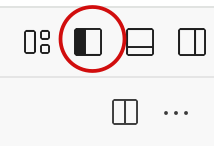
then select the terminal
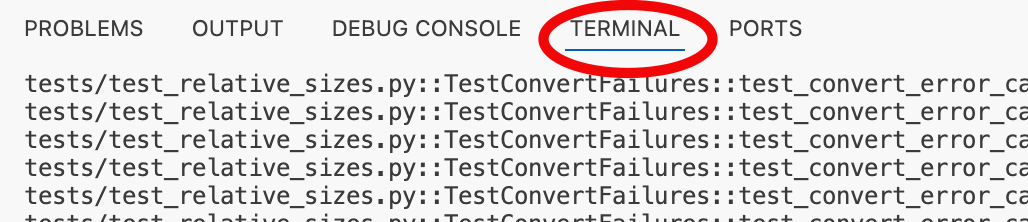
Please note – your access is not sandboxed: you can go into other users’ home
Working with change control
It's git. Select the branching change control icon on the LHS.
Commandline
source ~/llm-env/bin/activate to activate the llm tool and its python virtual environment. You should see (llm-env) at the start of your commandline when this is working. Deactivate it with deactivate
Change the prompt?
Use llm to change a prompt or write a new one
Change your script to pick up a new prompt.
Working with llm
Work on the command line with commands like:llm --help
llm templates --help
llm templates list
llm templates show «template name»
Changing a promptllm templates edit «template name»
Or you can go to llm templates path and edit the file in the editor.llm keys «your provider» to give it your API keyllm install «plugin for provider» to access a different LLM (you’ll need a key)llm models to list models
Working with the script
Change MAX_ATTEMPTS to give the LLM more attempts within the same conversation
Change LLM_TEMPLATE to pick up your own prompt
Change LLM_MODEL to switch model
Working with the sources
Change the code to pass a test – it’ll be an input to the next round, but may not stick!
Change the tests to push the LLM towards generating different code.
Change rules.md (or add comments to the tests) to give language-based hints
Running the tests
Jest
NODE_OPTIONS=--experimental-vm-modules npx jest --testPathPattern=web/test/jest/htmlhandler.test.js --collectCoverageFrom=web/src/js/htmlhandler.js
Python
pytest tests/test_relative_sizes.py -v
Troubleshooting web stuff
Python
App page gives a 502 error? Perhaps you’ve got a bad gateway?
sudo systemctl status flask-james-webpy01 to see if flask is running (if it’s not, there’s no web page)
sudo journalctl -u flask-james-webpy01.service -f --no-pager -n 50 to see what’s up with flask
If you see ImportError: cannot import name you may have an integration error.
Check Flask service sudo systemctl status flask-«james»-«webpy01»
If it's failed, check why sudo journalctl -u flask-«james»-«webpy01» -n 20
Check if port is listening (see bottom of IDE window for port) sudo netstat -tlnp | grep :«8001»
Check nginx error logs sudo tail -n 20 /var/log/nginx/error.log
More
Here are some insights into the choice of LLM
 James Lyndsay
Here's what the workshop cost
 James Lyndsay