
Exercise: Build Throwaway Tools
10-15 mins building and talking, 5 mins talking about building.
Build env if you need one: https://redir.workroomprds.com/
Ephemeral tools are built and thrown away. We can of course build them and keep them and share them – and then they're no longer ephemeral. So here we'll practice building tools with very little investment.
We're going to build tools to suit several briefs. You'll use your knowledge, and work together, and at the end you'll have a working rubbish tool. I've got a working version of each if you want hints. Then we'll think about how we built, and how we might build tools that we actually need.
Exercise 1 – page load time
We want a one-line command-line tool to return page load times, so that we can catch it as a repeatable metric.
Working example: Load Time in One Line, which builds on a big tool, and removes all but the salient data.
Exercise 2 – check dependencies
We want a tool which, given a list of strings, checks to see which are used in nearby files, and which strings are unused.
Examples at https://github.com/workroomprds/template_lists_example .
git clone https://github.com/workroomprds/template_lists_example
Working example: checkrefs.sh, which is a small and inspectable shell script that opens the door to a command-line one-liner.
Exercise 3 – recent events
We want to see the most-recent entries in the most-recent logs.
Working example: recent events – this command-line one-liner uses xargs to run commands on each row of an output.
Exercise 4 – spreadsheet
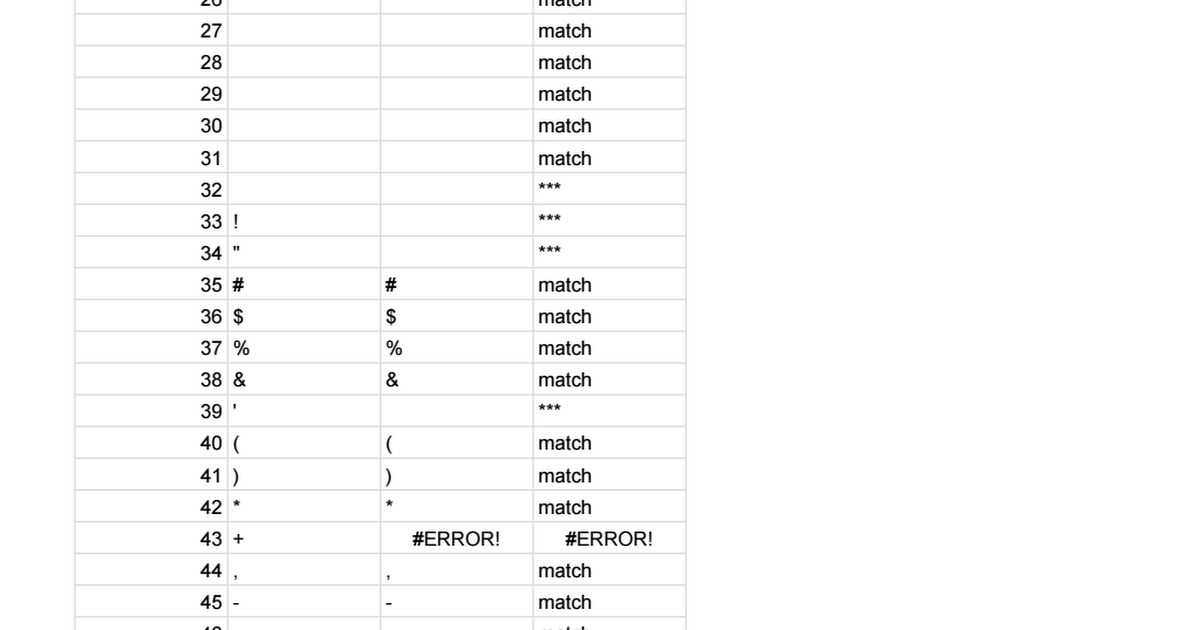
We want to discover what characters can't easily be pasted in google sheets. Heaven knows why...
Working example: The linked sheet is an example of 5000 checks.
- A is a list of numbers
- B is a character representing the number
- C is a copy/paste of B
- D is a check of B vs C, and has a filter.

Exercise 5 – coming
Wrap up
5 mins
Let's share how we built.
How I build tiny tools
If I'm thinking about data transformation, I'll often have a vague idea of input and output.
If I'm thinking about repeated actions, I'll often have an idea about what to change / iterate, and what to keep the same. I'll know whether I want that for efficiency, for accuracy, or to do something I can't otherwise do.
I've got a basic idea of command-line redirection, scripts, spreadsheet coding, scripting, and my current set of tools. This helps me to see opportunities for tooling.
I've used LLMs to get me to the right place with some of these, but those interactions often give too much, or too little.
Sometimes, I ask LLMs about tool capability. I know I can (generally) handle getting information into or out of a tool – but perhaps the capability I need is lesser-known.
I'll use stackoverflow to see if anyone else has a similar problem – and the range of solutions may be more interesting than the solutions themselves.
I'll want to consider quality by sanity checks, by inspection, by trying in the small, by trying edge cases, by asking a colleague or an LLM to parse. But my preferred approach to tiny tooling is to have something where problems are obvious without being painful, and run the tool several times looking at what it does. I rarely go test-first, but I often go example-first.
Tools should have a purpose – let's share how we recognise our needs, and how we reckon that a tool might help.
More on Ephemeral Tools, and the page of tiny tools.



Comments
Sign in or become a Workroom Productions member to read and leave comments.