

`sort` Exercises
Subscribers get to work together on these in Workroom PlayTime 011 on 3 April, 3pm London time, Zoom and Miro.
Go to Workroom PlayTime 011 for login etc.
There is a (very draft) info page at https://www.workroom-productions.com/p/e0bf704b-5e17-4828-ace2-fde1f68306bd/
Exercises
Files
ex01 has one single-digit number per line, and is unsorted.
ex03 has data in comma-delimited columns. The first three columns are date, first name, surname.
ex04 contains some month names / abbreviations, in order as far as English months are concerned. ex04a contains variants.
ex05 – one number per line like ex01, and sometimes a letter.
ex06 contains randomly ordered numbers, with some duplicates, and ex06b contains a collection of numbers with some in 1E6 notation.
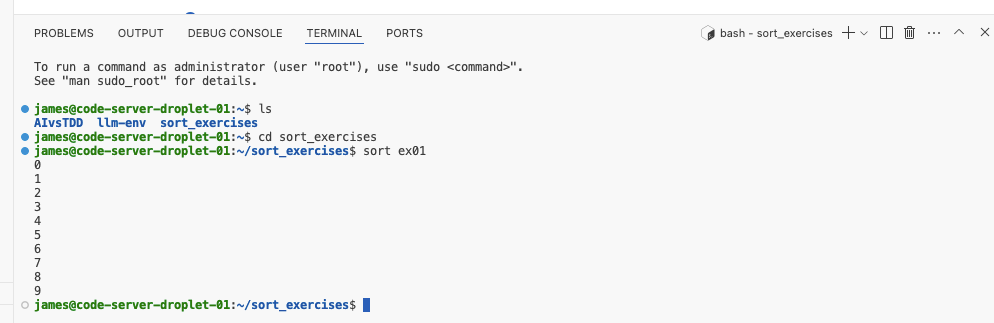
Go to https://envs.workroomprds.com, pick a user, drop through to VSCode in the browser. The files to sort are in ~/sort_exercises. We'll be working in the terminal, and you should see something like this at the bottom of your window:
Exercise 1: Basic use
Type cat ex01 on the command line to see the contents (or look using the file browser).
- Type
sort ex01to see the output on the command line. - Compare
sort ex01withsort -R ex01andsort -r ex01
sort «option(s)» «file(s)»Sort can reverse with
-r ... and randomise with -RExercise 2: Plumbing
- Compare
cat ex01 | sortwithsort ex01 - Use
sort ex01 > output_of_ex02to sort into a file calledoutput_of_ex02 - Use
sort ex01 | lessto open the output in a a file readerless. Useqto exit the editor.
sort is all set up to be used with other commands. As a standalone tool, with real data, it is a bit unwieldy – it's best used with other tools.
Exercise 3: Columns
Testers need to work with complex data, and need a column sort.
Use sort -t, -k3,3 ex03 to sort it by surname
Use sort -t, -k2,2 ex03 to sort by first name.
Use sort -t, -k3,3 -k2,2 ex03 to sort by surname then first name, and compare with sort -t, -k3,3 -k2,2r ex03 which reverse the sort of the first name.
sort compares whole lines, character by character.Columns need delimiters:
sort uses space by default, and takes the -t option to change. Specify -t, to use commas and -t$'\t' to use tabs (probably). Use options twice to sort on two columns. Use modifiers to change the type of sort.
-k2,2 to specify a sort on your data's second column. Use
-k2,4 to sort on the second, third and fourth columns. If you specify
-k2 you'll sort on the second column and everything to the left. It's weird, don't do it.Exercise 4: Checking
You can check if something is sorted with sort -c – which is handy if you're checking a sort for a test, or pre-qualifying some data.
Use sort -c on any of the earlier files – note the error shows the line and the content of the first non-sorted entry.
Use sort -c ex04 to see that a problem is on line 2.
Use sort -Mc ex04 to see that the check changes if told to expect to sort months, and within that style of sort, it accepts varieties of abbreviation and case.
sort -c to check whether data is sorted, in various types of sort.Options can stack
This exercise produces not a lot of output – here's the contents of ex04 for interest.
January
Feb
mar
April
dEcEmBeR
Exercise 5: Reducing
Sort can throw away duplicates. This is handy to see what data is in use (i.e. if you want unique account numbers, a list of this sessions error messages), and is handier using a columns selection.
- Compare
sort ex05andsort -u ex05– what's thrown away? - Compare
sort -k1,1 ex05andsort -uk1,1 ex05– what's lost now? - Weird one: Compare
sort -M ex04aandsort -Mu ex04a– what month names are kept?
-u throws away duplicates'duplicates' depends on the sort
u goes at the start, n at the end, column stuff in the middle...Exercise 6: Problems and avoidances
Use sort ex06 to see a problem. Try sort -n ex06 to avoid it.
Try sort -g ex06b to see how that works...
sort's default is to sort by character.option
-n sorts by value*
-d dictionary sort – good for names i.e.O'Leary and New York.*
-f caseless i.e. a before B before c.*
-g scientific numeric i.e. 1E-2 is sorted as 0.01*
-h human numeric sorts 1 before 1K before 1G*
-M English month acronym sorts jan before feb.Testing: look out for the 'wrong' sort: it may only be revealed by novel data. Other systems may break when the 'wrong' sort is corrected.
Exercise 7: Sort and merge
Try sort -g ex06 ex01 ex06b
Sources
Linux sort Command with Examples
Wikipedia sort (Unix)
Man pages
https://ss64.com/bash/sort.html
Sprue below - not useful.



Comments
Sign in or become a Workroom Productions member to read and leave comments.