
Local LLM Tooling: Code Queries with `graphify`
I’m trying out a local LLM (Qwen3.5:9b) and harness (Pi) on a real project (FlockXR), running the whole thing on a 32GB M2Max with the agent running in a container (Docker) and the LLM running under Ollama.
Running locally mandates using small models. Compared to frontier cloud models (thirsty, farty, costly, someone else’s), models that run on my hardware are slow, have small context windows, and seem dim. They need all the help they can get, and with the fixed compute resources available, that means they need more patience and more hand-holding. Right now, I’m working on hand-holding by managing context – the crisper my request, the more likely the model's output is valuable.
I’m using minimal pi as my harness so that I can have some of the advantages of a coding agent without too much of the weight.
Here, I’m playing with context management by using tools – the idea is that up-front work by a focussed tool can give the LLM some handholds, using a ‘skill’ to allow the LLM and the agent to interpret the results of the up-front work.
As a tester, I want to know about the code structures of the projects I’m working on. We know tools to help with that for large repositories: DeepWiki gives them human-readable shape, SourceGraph lets humans and agents search, manage and understand them.
I want something open-source that can help agents, and I've chosen graphify . Graphify's up-front work is a deterministic analysis of the code, producing a graph.json . That file, and the graphify skill to read it, give later LLM-based code queries more power for fewer tokens.
Lazily, I asked pi to use the graphify skill to run graphify itself. I was swiftly into the weeds:
- turns out
graphifywould very much like to use an LLM, determinism or not. - between them,
piandgraphifyinsisted on accessingOllamavia the wrong URL (localhostwhen the LLM is outside the container), graphifywanted a key, while knowing thatOllamaneeds no key- on the host, requests from
piand fromgraphifyvia ollama into the LLM seemed to clash and the LLM sometimes stopped responding
Taking a less-hands-off approach, I ran it successfully from the (container’s) commandline with:OLLAMA_BASE_URL=http://host.docker.internal:11434/v1 OLLAMA_API_KEY=dummy graphify extract /workspace/flock --global --wiki --as flock --backend=ollama --model qwen3.5:9b --max-concurrency 1 --code-only
Once it was running, it took ages. graphify’s deterministic piece took a few minutes, but then switched into ‘semantic analysis’, which went silent. Looking at the requests made into Ollama, I could see that some were timing out after 10 minutes, and occasionally (less often) graphify’s log would tell me that a ‘chunk’ of 100 somethings had timed out. Sometimes the run would just fail with a timeout, sometimes it would end early and not produce anything, and when it finally got to a graph.jsonand a GRAPH_REPORT.md, the output was horrible – telling me that the ‘god nodes’ (the most-reference elements) were things like Hi and fd. Frustratingly, the artefacts were so off that the graphify skill typically told pi that the analysis hadn’t been done, and the bastards tools started all over again.
Have I mentioned that I was working on this on the hottest June day that has yet been measured in the UK, and that the metal machine under my fingertips is running a local LLM? I took off my bow tie and my top hat, rolled up my sleeves and finally shut down my 300-tabbed monster browser.
OLLAMA_DEBUG=1, or even OLLAMA_DEBUG=2 (and run ollama from the commandline in its owwn terminal) so I could watch the requests– but those didn't offer me much more than timestamped notes that a request had been made or returned. Watching the network with sudo tcpdump -i lo0 -A 'tcp port 11434' or tcpdump -i any -A port 11434 did show me what was going on – and while it isn't readable, lets me see roughly whats in the context.On enquiry, I could see thatgraphify was merrily processing binary as code. .graphifyignore let me tell the tool to ignore images and sounds. I could see that Hi and obscure friends came from obfuscated built code, and ignored that, too. I recklessly ignored documents and html for good measure. After that work, graphify needed 5 minutes working deterministically and an hour or so working with the LLM doing semantic analysis on just 7 files to produce its graph.json file. But not the --wiki that I'm sure you noted I had asked for, above.
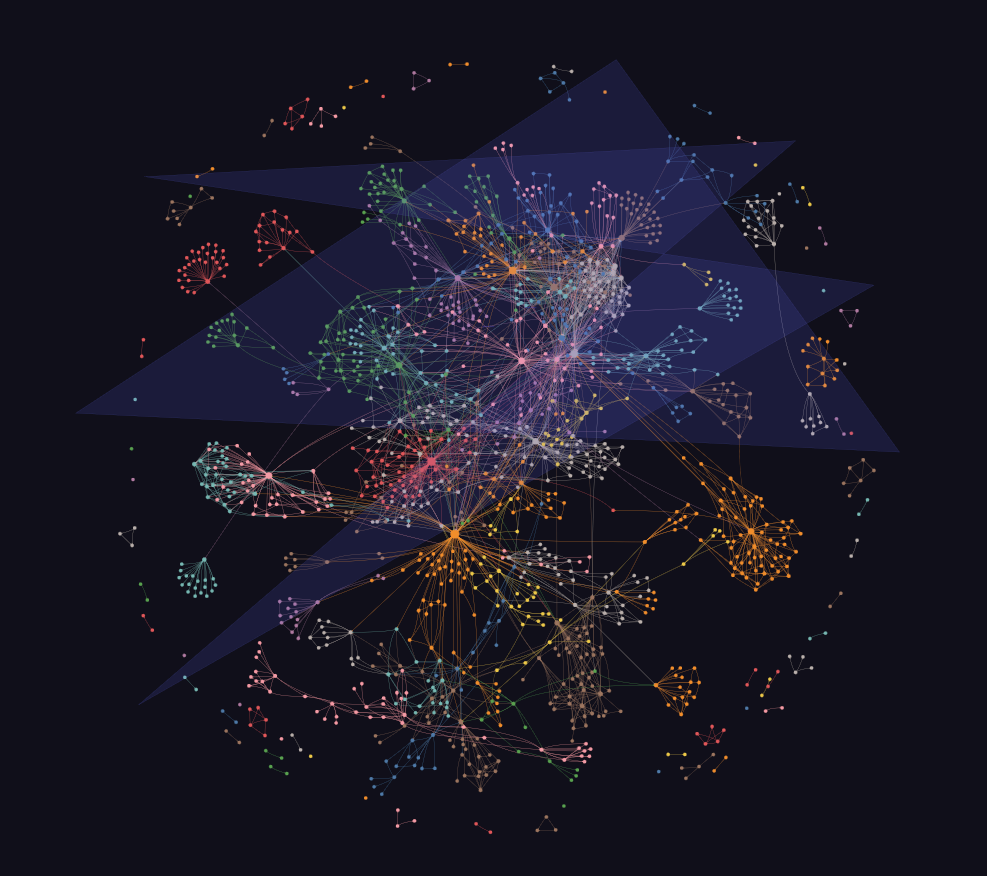
I could run graphify cluster-only /workspace/flock to make a pretty graph. I did so, and about 90 minutes of LLM-thrashing later, it did. What a very pretty graph – and how irritatingly labelled. Several hundred labels for usefully-named elements, most of them labelled in the pattern community nnn. Anyway…
With the analysis data all prepared for the skill, I asked my agent (in several conversations) about tests (I wrote a bit of Flock’s test harness), keyboard navigation and about error handling.
My pattern was: ask initial – ask for more depth (based on what had been produced) – write report – [new convo] check facts – consolidate report. I skimmed outputs before taking the next step.
And the output using this crisp context and this dinky local LLM is… OK. Readable. Correct, on my uninformed view, and more complete and informative than I might have imagined. References to code check out. It feels like it would be useful to me, as a tester.
Have a look for yourselves:
I have no immediate idea how much power I’ve used, but let’s say it’s an 80W laptop for 5 hours at full blast, so about 0.4kWh. I’ve not extracted any water from the watertable for cooling, but I’ve had to change my own shirt.
Comments
Sign in or become a Workroom Productions member to read and leave comments.